


CastAll: TV Mirror & Stream
3.67.00 Reviews
App Specs
- Version
- 1.0.0
- Updated On
- License
- Free
- Downloads
- 100,000+
- Developer
- PureSoft Studio Inc
- Categories
- Tools
- Platform
- Android
Screenshots
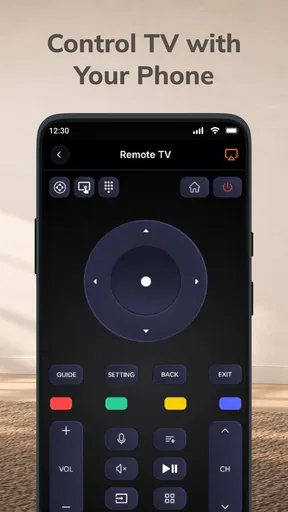
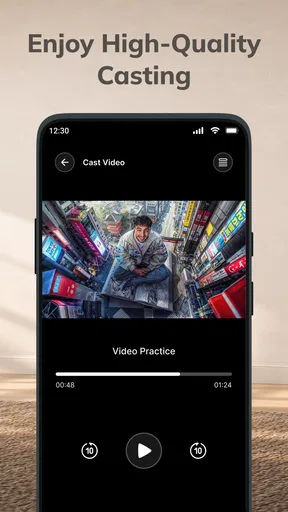
 Analysis by AppCompare
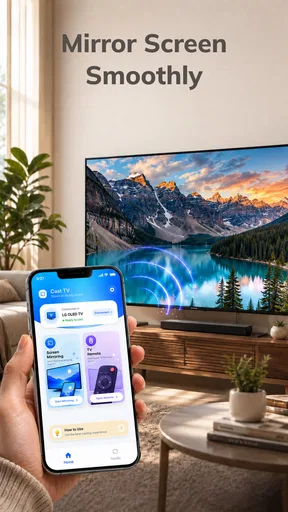
I judge a screen-mirroring app by a simple test: does it make sharing something on my phone with people in the room feel easier than passing the phone around? CastAll: TV Mirror & Stream is built for that job. It is a free tools app from PureSoft Studio Inc, centered on sending a phone’s display to a television and offering TV control through a smart remote. That combination is appealing when the phone is already where the content is, but the usefulness depends on how smoothly your particular TV and phone work together.
What mirroring changes when the phone is the source
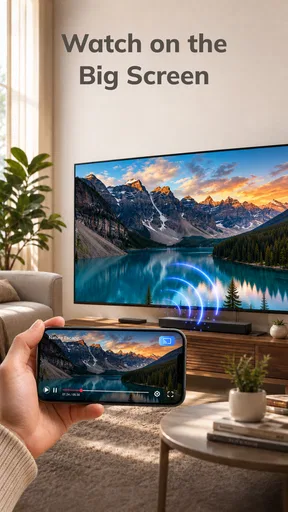
Screen mirroring puts the phone’s display on a larger screen, so the value is less about discovering new content and more about making existing phone content easier to watch or share. I find that distinction useful: this is the kind of tool I would reach for to show a group a photo, follow along with a page, or put a clip on the living-room TV without asking everyone to crowd around a handset.
The advantage over opening a separate TV app is that I can start with what is already on my phone. I do not have to search for the same item again on the television or switch between devices just to show a short piece of content. In a casual setting, that can make the interaction feel more natural. The phone remains the point of control, while the television becomes the shared viewing surface.
That flexibility has a corresponding limitation: mirroring reflects the phone experience rather than turning the TV into a fully independent playback device. Phone notifications, changes in orientation, and other on-screen activity can matter when the whole display is being shared. Before mirroring something in front of other people, I would close anything private and consider whether I want the phone’s screen shown continuously. This is a practical habit, not a special CastAll feature.
The app’s summary also points to TV control through a smart remote, which makes the idea broader than simply duplicating the display. Still, I would treat mirroring as the main reason to try it and judge the remote element by whether it works with my own setup. The app is currently at version 1.0.0, so I would keep expectations measured rather than assume it has the polish or breadth of a long-established TV platform.
Starting with the devices you already own
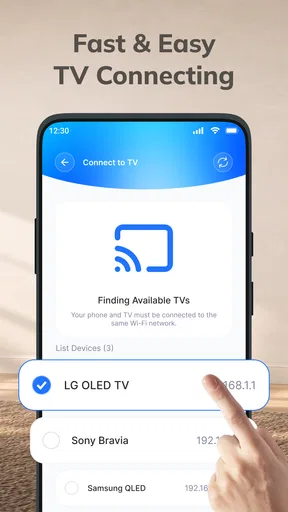
In practice, the first question is compatibility: the phone and television need a way to communicate for casting to work. I would start with both devices connected in the way their own network and casting settings expect, then open CastAll and look for the TV. If it does not appear, I would check that the devices are on the same local network and that the television’s screen-sharing or casting option is enabled before repeatedly tapping through the app.
That order matters because a missing TV is not automatically an app failure. A television may have its own casting mode, a separate input, or a built-in platform that handles sharing differently. Checking the TV’s settings first is often quicker than changing several phone settings at random. If discovery still fails, restarting the app and rechecking the TV’s connection are sensible next steps; I would not assume that every television supports the same method.
Worth Reading Before You Choose

Flipboard Shows What News Apps Must Do Beyond the Feed

Switching to Android Auto Means Rethinking Your Driving Routine

Google Calendar Makes a Crowded Week Easier to Manage

Ludo King Makes the Most of the Minutes Between Plans

Baby Panda World Brings Quick Play to Modern Phones, but Its Game Library Feels Busy

ESPN’s Live Game View Makes Following Close Games Easier
Once connected, the useful workflow is straightforward: choose the screen you want others to see, keep the phone available as the source, and make any adjustments on the handset. For a short presentation, I would open the relevant material before connecting, set the phone’s orientation, and silence notifications. Those small preparations reduce interruptions and avoid making the audience wait while I navigate through unrelated screens.
There is also a meaningful difference between showing a whole screen and using a television’s own app. If I want to share something brief or move between several items, mirroring can be convenient because I stay on the phone. If I plan to watch a full-length film, a native TV app or a dedicated streaming device is often a better choice: it avoids keeping the phone tied up and may offer a more direct viewing path. I would use CastAll for flexibility, not assume it replaces every TV app.
A useful living-room moment, and a couple of less obvious habits
A realistic example is looking through holiday photos with family. Instead of handing the phone around, I can put the pictures on the TV and move through them from the handset. The person holding the phone can decide what to show, while everyone else sees the same image at a comfortable size. This is where mirroring earns its place: it turns a personal screen into a shared one without requiring the group to gather around the device.
For this kind of session, I would prepare the album first and avoid relying on quick swipes while people are watching. A brief pause between images gives the group time to look, and keeping the phone in portrait or landscape as appropriate prevents an awkward change in framing. These are simple workflow choices, but they make a mirrored session feel deliberate rather than like a phone screen accidentally projected onto the TV.
A second useful case is demonstrating something that is easier to explain visually than verbally, such as walking a relative through a page or showing a map. The larger display lets several people follow the same steps. The tradeoff is that personal information can become visible, so I would navigate to the relevant screen before starting and avoid opening messages or account pages during the demonstration.
For a quick video, the phone-as-source approach can also save the search of locating the same clip on the TV. But it is less appealing if I need to use the phone for something else while the video is playing, or if interruptions would spoil the viewing. That distinction helps me decide whether to mirror or use a built-in television service before settling in.
Where the convenience can fall short
Mirroring is only as comfortable as the connection between the devices. If the TV is not discoverable, the network is unstable, or the television handles screen sharing poorly, the simple idea can turn into troubleshooting. I would not choose this as the only plan for an important presentation or a time-sensitive gathering unless I had already tested the setup. A cable, a familiar casting method, or the TV’s own app may be a safer fallback depending on the equipment available.
There can also be a gap between seeing a phone display and having an ideal TV viewing experience. A handset interface is designed for a small screen, so menus and text may not look as comfortable from across a room. Some content is simply better opened directly on the television. CastAll’s appeal is control from the phone, but that does not automatically make every phone-based activity pleasant on a big screen.
The smart-remote idea is convenient in principle, especially if I want one app for both sharing and basic TV control. In real use, I would verify that the remote function suits my television rather than assume it can replace the physical remote in every situation. If I need dependable control for a particular TV, the manufacturer’s own remote app or the original remote may be the more reliable choice.
It is also worth separating “free to install” from “works equally well everywhere.” CastAll costs nothing to download, which makes it low-risk to test, but the experience still depends on the devices and network around it. I would try a short, low-stakes session first, then decide whether it is dependable enough for regular family viewing. That is more useful than judging the app from its premise alone.
Who should give CastAll a try
I can see CastAll suiting someone who often has material on a phone that they want to show to other people, especially when the television is nearby and the sharing is informal. It is a sensible fit for family photos, short demonstrations, or quickly putting phone content in front of a group. The app has an average rating of 3.6 from around a thousand ratings, and it has been installed over a hundred thousand times, which suggests that people are trying it, though those figures are not a substitute for checking compatibility in your own home.
The age rating is Everyone, and the app is free, making a trial straightforward for households that want to see whether phone-to-TV sharing fits their routine. Android support starts with version 8.0. I would still think about who will use it and what they plan to mirror: an easy setup for a shared slideshow is a different standard from dependable daily TV control.
I would skip it if I mainly want a polished streaming experience for long films, need a guaranteed connection for work, or prefer content to play directly on the television without keeping a phone involved. In those cases, a TV’s built-in apps, a dedicated streaming device, or a wired connection may be a better match. Likewise, if the television does not support a compatible casting route, installing a mirror app alone will not solve that hardware limitation.
My practical recommendation is to treat CastAll as a convenient bridge between phone and TV, then test the bridge with something unimportant before relying on it. It is at its best when I want to share what is already on my handset and remain in control from there. If that describes your everyday use, it is worth trying; if your priority is uninterrupted, TV-native playback, I would choose a more direct option instead.
PureSoft Studio Inc’s app is a focused tool rather than a reason to change how you watch everything. I like the idea most for those small moments when a phone has the right content but the wrong-sized screen. With a compatible television and a little preparation, CastAll can make sharing feel easier; without those conditions, its convenience is less certain. That makes it a practical option to test, not a universal replacement for the usual ways of watching on TV.
Choosing the right kind of sharing for the moment
One question I would ask before opening the app is whether everyone needs to see the phone itself or only the finished content. That small distinction can save time. A photo album or a page that I am explaining benefits from showing the full handset view; a film that the TV can play on its own usually does not. I use the first approach when the phone is part of the activity and the second when I want the television to take over.
This also helps set expectations for sound and attention. When the phone is acting as the source, I need to keep it nearby and avoid treating it as a device I can freely put away. If I want to browse messages or answer a call while other people watch, mirroring is a poor fit for that stretch of time. Choosing a TV-native playback option first is less flexible, but it leaves the handset free and makes the viewing feel more independent.
Small checks that make a first attempt smoother
For a first test, I would choose something short and easy to restart, rather than begin with the one video or presentation I cannot afford to interrupt. I would also confirm that the TV is awake and on the expected input before searching from the phone. These checks do not guarantee a connection, but they make it easier to tell whether the difficulty is simply the television’s current state or a mismatch in the devices’ casting methods.
If more than one television is nearby, I would identify the intended screen before starting and make sure the name I select is the right one. That is especially useful in shared buildings or homes where devices may appear under names that are easy to confuse. Once the session is over, I would stop mirroring before returning to private tasks on the handset. It is a quick boundary between a shared screen and ordinary phone use.
What the ratings and free trial do—and do not—tell me
CastAll has a 3.6 average across around a thousand ratings, with seven written reviews. I take that as a reason to approach it with practical expectations, not as a verdict on whether it will work with a particular television. Casting depends heavily on the combination of phone, TV, and network, so another user’s smooth or frustrating session may not predict mine. The useful test is whether my own devices can find one another and stay connected during the kind of sharing I actually do.
Because it is free, I can try that test without first deciding to move all my viewing habits to a new system. I would judge the app on a few concrete questions: can I locate my TV, can I show the content I planned to share, and does the session remain comfortable enough that I would use it again? If the answer is yes for occasional photos or demonstrations, that is a real benefit even if I still prefer native TV apps for longer viewing.
CastAll is a focused option for people who want their phone to serve as the starting point for a shared TV moment. I would recommend it most to someone who values quick access to material already on a handset and is willing to check compatibility before relying on it. If the goal is hands-off playback, uninterrupted long-form viewing, or dependable control in every situation, I would choose a more direct solution. For the right casual use, though, the larger screen can make sharing feel less like passing a phone around and more like enjoying something together.
Pros
- Works with many popular smart TV brands and streaming devices.
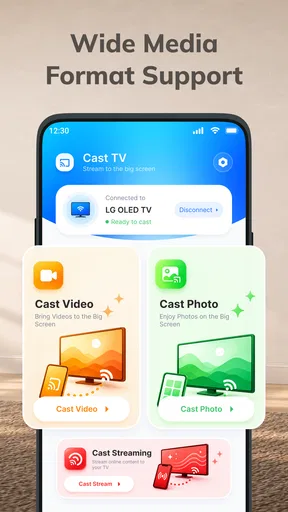
- Offers screen mirroring as well as photo and video casting.
- Simple setup makes it approachable for first-time users.
- Can be useful for sharing phone content during presentations.
- Provides a convenient way to view mobile media on a larger screen.
Cons
- Casting performance depends on your Wi-Fi network and device compatibility.
- Some features or destinations may require a paid upgrade.
- Screen mirroring can introduce noticeable delay for fast-moving content.
- DRM-protected videos may not display when mirrored or cast.
- The free version may include ads or usage limitations.
FAQs for CastAll: TV Mirror & Stream
What is CastAll: TV Mirror & Stream used for?
CastAll: TV Mirror & Stream is designed to send compatible media from a mobile device to a television or other supported display. Depending on the features available on your device and the connection method, it may let you cast videos, photos, or other content, and mirror your screen. Before downloading, check the app listing for the specific casting options it currently supports.
How do I connect CastAll to my TV?
In most cases, your phone and TV need to be connected to the same Wi-Fi network, and the TV must support a compatible casting or screen-mirroring technology. Open CastAll, allow it to look for available devices, and select your TV when it appears. The exact steps can vary by TV model, phone, and app version, so consult the in-app instructions if the device is not detected.
Does CastAll work with every television and phone?
Compatibility is not guaranteed across all televisions, streaming devices, or mobile phones. It depends on the TV’s casting support, your phone’s operating system, network settings, and the capabilities offered by the current version of CastAll. Check the app’s store listing and your TV’s manual before installing, especially if you plan to mirror the entire screen rather than cast supported media.
Why might screen mirroring or video casting not work properly?
Casting problems can result from devices being on different Wi-Fi networks, a weak connection, outdated software, or restrictions imposed by the TV or the content provider. Some protected streaming services may block screen mirroring, even when ordinary photos or videos work. Try restarting the app and devices, confirming network access, and checking the app’s troubleshooting guidance; results can differ by device and service.
Is CastAll: TV Mirror & Stream free, and does it require permissions?
Check the current app-store listing for CastAll’s pricing, in-app purchases, subscription terms, and any advertising, since these details can change by platform or version. A casting app may request permissions needed to find nearby devices or access media you choose to share. Review permission prompts and the privacy information before granting access, and avoid sharing sensitive content on a screen others can see.


